The first step to create an application dashboard using Wirecloud is the discovering of the components you are going to use. You can obtain those component in several ways, but one of the easiest way is accessing the Wirecloud catalogue. This catalog is seamlessly integrated with the FIWARE Marketplace. This marketplace is in turn made up of stores, where they can offer and deal with Application Mashup Components (MACs), namely widgets and operators, but also other existing mashups, they can combine to create value added application dashboards connected to backend services and datasets. On the marketplace, you can quickly search, find and compare widgets, operators, and even pre-built mashups. We differentiate the marketplace from a store. While a store is owned by a store owner who has full control over a limited widget, operator and mashup portfolio and offerings, a marketplace is a platform for many stores to make their offerings available to a broader audience and enable consumers to search and compare widgets, operators and pre-built mashups and find the store, where to buy. The final business transaction (buying) is done at the store and the whole back office process is handled by the store.
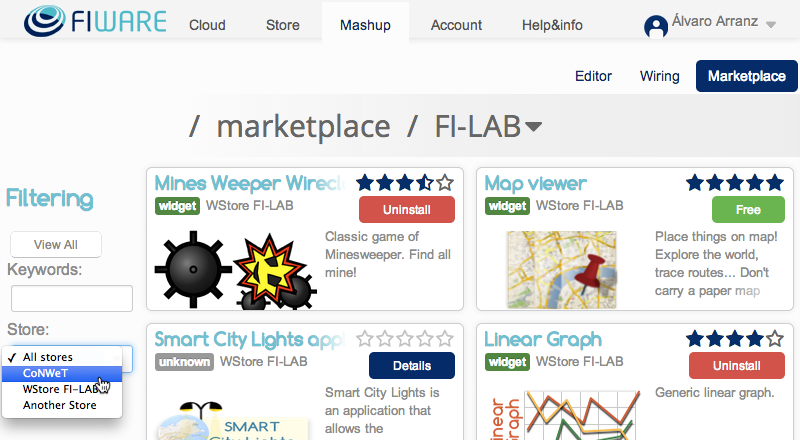
The following figure shows a screenshot of the Wirecloud catalogue, where you can see the FIWARE Lab marketplace and the different stores made available through it:
The Wirecloud community has already made available an ever-growing catalogue of widgets, operators and pre-built mashups that help you to create your application dashboards. Some of them take advantage of other GEris like Kurento, CKAN or Orion. As an example, the Kurento catalogue includes widgets for creating and supporting videoconference features in your application dashboards. Others make use of existing open source libraries to provide layered maps, interactive charts, tabular views, etc.